
Arabic School Software1.0 - Download
You'll be able to download in few seconds.
Publisher Description
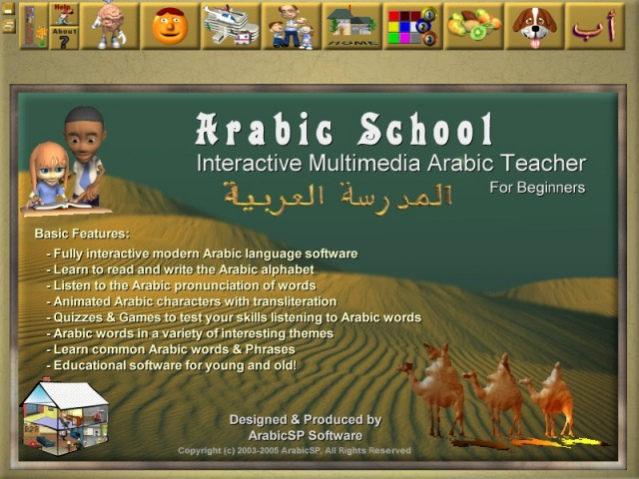
Discover Arabic with our simple, yet fully interactive Arabic language software. Designed for people who want to learn Arabic fast and easy. Suitable for beginners and ideal for children. Animated characters are used throughout the lessons. The application features quizzes and games to make it fun and easy to learn Arabic. Learn how to read and write the entire alphabet. Learn Common Arabic Words and Phrases, Learn how to read and write standard worldwide-spoken Arabic. Learn things about your home and many more topics, such as animals. fruits, numbers, colours, buildings, transports, family, people, body parts and much more. The software is designed for all ages who wants to Learn Arabic Fast and Easy. The Presentation is designed to make learning easy and fun for everyone. Adults can use it to learn basic Arabic. Children will enjoy the fresh and fun approach and beautifully simple interface. For advanced users you'll find options which allow the program to be changed to suit your requirements.
About Arabic School Software
This Languages program is available in English, ChineseSimplified, Czech, Danish, Finnish, French, German, Greek, Hungarian, Italian, Japanese, Polish, Portuguese, Russian, Spanish, Swedish, Turkish, Urdu. It was last updated on 29 September, 2026. Arabic School Software is compatible with the following operating systems: Windows.
The company that develops Arabic School Software is Learn Arabic. The latest version released by its developer is 1.0.
The download we have available for Arabic School Software has a file size of 8.4 MB. Just click the green Download button above to start the downloading process. The program is listed on our website since 2005-05-05 and was downloaded 0 times. We have already checked if the download link is safe, however for your own protection we recommend that you scan the downloaded software with your antivirus. Your antivirus may detect the Arabic School Software as malware if the download link is broken.
How to install Arabic School Software on your Windows device:
- Click on the Download button on our website. This will start the download from the website of the developer.
- Once the Arabic School Software is downloaded click on it to start the setup process (assuming you are on a desktop computer).
- When the installation is finished you should be able to see and run the program.
Program Details
General
System requirements
Download information
Pricing
Version History
version 1.0
posted on 2005-05-05
Arabic School v1.0 is the latest software release which has all the features older releases of ArabicSP versions have Plus Many
Disclaimer
External Download
We do not host Arabic School Software on our servers. We did not scan it for viruses, adware, spyware or other type of malware. This app is hosted by the software publisher and passed their terms and conditions to be listed there. We recommend caution when installing it.
The external download link for Arabic School Software is provided to you by apps112.com without any warranties, representations or guarantees of any kind, so access it at your own risk.
If you have questions regarding this particular app contact the publisher directly. For questions about the functionalities of apps112.com contact us.
